search cyberlink website user log-in change language
PhotoDirector 365 app icon

PhotoDirector 365

All-in-One Photo Editor

Get it on Google Play
PhotoDirector 365

On-Device AI Photo Editing, Powered by Intel Core Ultra

Generate, enhance, clean up, and retouch on your own PC, with no uploads, no credits, and no generation limits. Available now in PhotoDirector 365 on Windows 11 PCs with Intel Core Ultra 200V (Lunar Lake) or Intel Core Ultra Series 3 (Panther Lake) processors.

2×Up to 2× faster VLM-powered AI workflows on Intel Core Ultra Series 3
1.6×Up to 1.6× faster AI Deblur on Intel Core Ultra Series 3
NPUSupported AI runs on the built-in NPU, using less power
32GBRuns on Intel AI PCs with 32GB of memory or more
Two ways to work

Choose Where Your AI Runs, Project by Project

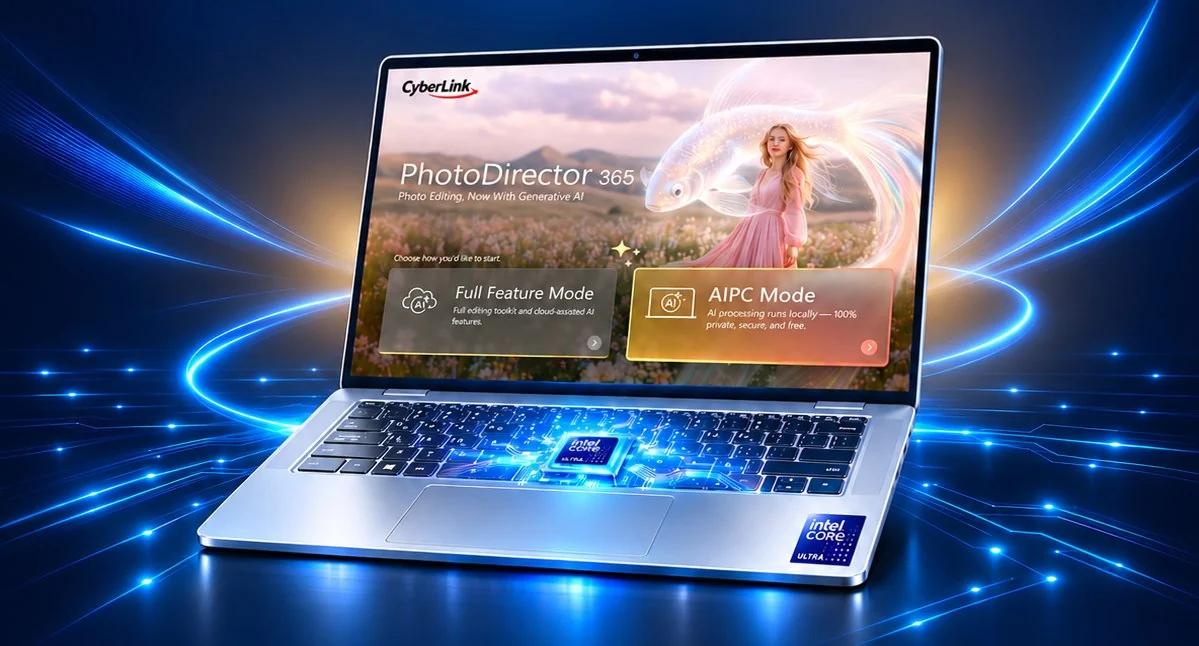
PhotoDirector opens with a choice. Keep high-volume work 100% on your Intel Core Ultra PC, or use the cloud when a project needs the most demanding models. Change modes anytime from the top bar.

AI PC Mode

Optimized for Intel Core Ultra

A dedicated on-device workspace. Supported AI tools run on your Intel Core Ultra processor and its built-in NPU, so your photos never leave your PC.

  • Unlimited local runs, no credits spent
  • Private & secure
  • Works offline

Full Feature Mode

Everything in PhotoDirector 365

The complete PhotoDirector 365 toolkit, including cloud-assisted tools. Video and the most demanding image models run in the cloud at top quality.

  • AI Image to Video and AI Model Lab
  • The latest cloud image and video models
  • May use AI credits
One on-device workspace

Everyday AI Edits, Running Locally on Intel Core Ultra

AI PC Mode brings generation and editing together in one workspace, so you can take a photo from first edit to final retouch without leaving your PC.

Generative Editing

Create a new image from a prompt, edit a photo by describing changes in plain language, or replace an object with a few words.

  • AI Image Generator
  • Edit by Chat
  • AI Replace

Fix & Enhance

Remove noise and blur, recover faces, upscale small images, and correct color in one click.

  • AI Denoise
  • AI Deblur
  • AI Face Deblur
  • AI Image Upscaler
  • Auto Color Enhancement

Background Editing

Cut out the subject and swap in a new background, all without uploading the shot.

  • Background Removal
  • Background Replacement

Remove & Clean Up

AI detects people, objects, and power lines automatically, then removes them and fills in the background.

  • AI Object Removal
  • AI Wire Removal

Portrait & Style

Try on outfits and hairstyles, retouch faces, and reshape bodies, all on your PC.

  • AI Try-On
  • AI Hairstyle
  • Face Beautifier
  • Body Reshaper

Need video or the latest cloud models?

Switch to Full Feature Mode from the top bar for AI Image to Video, AI Model Lab, and the rest of PhotoDirector 365.

Explore all features →
Why on-device

More Control Over How Your Work Is Processed

Unlimited Local Runs, No Credits

Run supported AI features right on your Intel Core Ultra PC, as much as you want, with no credits spent and no per-generation fees.

Private & Secure

Edits you make in AI PC Mode stay on your PC, so client shoots and unreleased work aren’t uploaded to the cloud.

Dedicated AI Engine

Supported AI runs on the built-in NPU, which handles AI tasks while using less power.

Keep Editing Offline

Work on a plane, on location, or anywhere the connection is unreliable.

Accelerated on the built-in NPU

Optimized for Intel Core Ultra

Intel Core Ultra processors combine a CPU, a GPU, and a dedicated NPU for AI in one chip. On Intel Core Ultra, PhotoDirector runs supported AI on the NPU to accelerate on-device tasks while using less power.

On the latest Intel Core Ultra Series 3 processors, CyberLink’s AI workloads run up to 2× faster than on the previous generation, so demanding edits finish sooner on a thin-and-light laptop.

PhotoDirector 365 launcher on an Intel Core Ultra laptop Intel Core Ultra

Intel Core Ultra Series 3 vs. the Previous Generation

PhotoDirector AI workloads on an Intel Core Ultra X7 358H (Series 3) compared with an Intel Core Ultra 7 258V (Series 2).

2×faster VLM-powered AI workflows
1.6×faster AI Deblur
Relative performance of PhotoDirector AI workloads on Intel Core Ultra X7 358H compared with Intel Core Ultra 7 258V
WorkloadIntel Core Ultra 7 258VIntel Core Ultra X7 358H
VLM-powered AI workflows
1×
Up to 2×
AI Deblur
1×
Up to 1.6×

Based on CyberLink internal AI workload testing as of December 22, 2025, on comparable Windows 11 systems with optimized performance settings: Intel Core Ultra X7 358H versus Intel Core Ultra 7 258V. Actual performance varies by PC configuration, drivers, and settings.

Built for sensitive visuals

Keep Creative Assets Inside Your Own Systems

For creators, everyday photo editing stays under their control. For agencies, real estate teams, and e-commerce sellers, product shots and campaign assets can stay on the systems where they were made and edited.

CreatorsAgenciesReal EstateE-commerce
“Intel® Core™ Ultra Series 3 processors are purpose-built to power next-generation AI and creative workflows. Through our close collaboration with CyberLink, these optimizations demonstrate how on-device AI can deliver faster, more responsive, and more intelligent experiences for marketers and creators.”
Carla RodriguezVice President of Client Software Enablement, Intel
Read the announcement →
Supported PCs

Available on Windows 11 PCs With Intel Core Ultra

AI PC Mode on Intel needs a Windows 11 PC with an Intel Core Ultra 200V (Lunar Lake) or Intel Core Ultra Series 3 (Panther Lake) processor, 32GB of memory or more, and an active PhotoDirector 365 subscription.

AcerASUSDell TechnologiesGIGABYTEHPLenovoMSI

Minimum requirements: Windows 11 or later · Intel Core Ultra 200V (Lunar Lake) or Intel Core Ultra Series 3 (Panther Lake) processor with an NPU · 32GB memory or more · 30GB free storage · See full specs

AI PC Mode Frequently Asked Questions

AI PC Mode is a workspace in PhotoDirector 365 that groups the AI tools able to run directly on your PC, from image generation to retouching. You edit without uploading photos to the cloud, and local runs use no AI credits.

Generative editing: AI Image Generator, Edit by Chat, and AI Replace. Image enhancement: AI Denoise, AI Deblur, AI Face Deblur, AI Image Upscaler, and Auto Color Enhancement. Background removal and replacement, AI Object Removal, and AI Wire Removal. Portrait and style: AI Try-On, AI Hairstyle, Face Beautifier, and Body Reshaper.

AI PC Mode is available now in the latest Windows version of PhotoDirector 365 (released September 2026 or later), as part of PhotoDirector 365 subscriptions on supported Intel Core Ultra PCs.

No. Tools in AI PC Mode run on your Intel Core Ultra PC with no credits spent and no per-generation fees. Cloud tools in Full Feature Mode may use AI credits.

Yes. Switch between AI PC Mode and Full Feature Mode anytime from the top bar, depending on what each project needs.

Yes. AI PC Mode processes on your device, so you can keep editing without an internet connection.

Not always. AI PC Mode uses smaller AI models installed on your PC, so results can differ from the cloud models in Full Feature Mode, and complex generation requests can take up to several minutes depending on your PC. For the latest cloud models, switch to Full Feature Mode.

Windows 11 PCs with an Intel Core Ultra 200V (Lunar Lake) or Intel Core Ultra Series 3 (Panther Lake) processor and 32GB of memory or more. Intel Core Ultra 200H, 200U, 200HX, and 200S (Arrow Lake) processors are not supported. If your PC qualifies, AI PC Mode appears on the PhotoDirector 365 launcher. AI PC Mode is also available on NVIDIA RTX Spark PCs; AMD processors are not supported yet. See the PhotoDirector 365 specs for details.

Performance figures from CyberLink internal testing; results vary by PC configuration. Source: CyberLink press release, Feb. 3, 2026.

Intel, the Intel logo, Intel Core, and Core Ultra are trademarks of Intel Corporation or its subsidiaries. All other trademarks are the property of their respective owners.